
Both rates can be right.
Calculating, segmenting and reporting retention and turnover so leadership can act
- In this article
- 1. different formulas result in different scopes of employees
- 2. be mindful of what denominator you use in your calculation
- 3. what a hiring wave does to both rates
- 4. follow hiring cohorts instead of one start-date group
- 5. separate the type of exit before you draw conclusions from turnover rate
- 6. give pivotal roles their own measure
- 7. avoid the "company average" trap by identifying the team behind the average
- 8. combine your turnover data with what your employees say before they leave
- 9. match the response to the reason people leave
- 10. how to make the numbers useful to a manager
- 11. what should be included on the board slide?
In this article
- Why the formula you choose to calculate attrition matters
- How choosing different denominators can lead to different narratives
- Why a hiring wave affects your turnover and retention rates
- Why you should consider a hiring cohort when calculating turnover and retention rates
- Why it’s important to distinguish different types of employee exits when evaluating turnover rates
- Why you should consider a special retention rate for pivotal roles
- How to use turnover and retention analysis to find problem areas
- How to analyze turnover in conjunction with employee feedback
- How to use turnover analysis to deliver the right response
- How to make turnover and retention rates meaningful for a team manager
- What to include on a board report slide
- How to check your turnover and retention definitions before the next board cycle
As John Boudreau and Peter Ramstad argue in Beyond HR, business leaders should focus their talent decisions on the roles where performance and availability make the biggest difference to business results.
Keep this in mind when your HR report presents an 88% retention rate but your finance department presents a 30% turnover rate at the same board meeting.
Both of these numbers could be correct.
Your retention rate measures people in a closed population (the people you have on the books on day one), while your turnover rate measures an open population (everyone who passed through your organization, including people who may’ve been hired or left since the last board cycle).
So which number should you present to the board?
Both numbers are important.
1. Different formulas result in different scopes of employees
At a high level, a retention rate measures how many employees stick around.
The discrepancy in your turnover data often comes down to what’s included in the numerator and the denominator.
Before you get into data manipulation, you should review the inclusion rules. For instance, your finance system may include transfers between legal entities, fixed-term contracts coming to the end of their term, or rehires (considered a termination and a new hire) in its turnover calculations.
Accepted reporting figures from the HR department typically exclude all of the above. HR departments also try to agree on continuous-service rules for rehires. A common approach is to consider any employee who’s re-employed within a specific window - say 30 or 90 days - as not having left at all.
One major difference comes from whether or not you include employees who only worked during the year. These employees haven’t been included in retention calculations, but they are included in turnover calculations.
Suppose you start the year with 100 employees, and you lose 12. Your retention rate for your original employees would be 88%. But if you consider 20 employees who were hired mid-year and left, you have 32 separations.
This impacts the denominator of your turnover calculation.
Similarly, retention rates have a built-in survivor bias. Since these figures only look at employees who started the year with you, they ignore your newest and most unstable employees - the ones most likely to leave. If your retention rate remains steady during periods of heavy hiring, it doesn’t give you much insight into how those new hires are performing.
You should always provide a population, a period, and inclusion rules when you report retention or turnover rates.
2. Be mindful of what denominator you use in your calculation
Different organizations use different denominators when calculating their turnover rate. Some use their starting headcount, some use their ending headcount, and others use a simple average of the two.
As you can imagine, this leads to different turnover rates using the same number of separations, especially if there are significant changes to the headcount.
For instance, let’s take two businesses that start the year with 100 employees and have the same number of separations - 20.
One business is growing and hires 40 new employees, ending the year with 120 employees. The other business shrinks and doesn’t hire any new employees, ending the year with 80 employees.
- If you use starting headcount as the denominator, both businesses have a 20% turnover rate.
- If you use ending headcount, the growing business has a turnover rate of about 17% while the shrinking business has a turnover rate of 25%.
- If you use a simple average of the starting and ending headcount, the growing business has a turnover rate of about 18% while the shrinking business has a turnover rate of 22%.
As you can see, the choice of denominator gives different impressions about the turnover rate in shrinking and growing business units.
All of the above calculations overlook another important consideration: when employees were actually working at the business.
If the growing business hired all 40 of its new employees in the final month of the year, it clearly wouldn’t have 110 employees (the average of 100 and 120) for most of the year.
A better approach is to take a monthly average by adding up the headcount snapshot for each month and dividing it by the number of months. This method considers all employees that were there on a monthly basis.
To ensure your calculation is accurate, choose a snapshot date (either before or after payroll cut-off, but the same date every month) and reconcile that snapshot with your separation records. If you’re sharing a year-to-date turnover rate with your board, be mindful of seasonal hiring and separations. You don’t want to overly inflate your turnover rate by overlooking seasonal patterns and multiplying the turnover rate for a quarter with seasonal separations to get an annualized number.
Discuss your choice of denominator with your finance team, document the decision, and use the same calculation method throughout the reporting year.
3. What a hiring wave does to both rates
A hiring boom can have opposite effects on turnover rates.
If most of your new hires stick around, your average headcount goes up and your turnover rate goes down (even though the number of people leaving hasn’t improved). But if you rush to hire and experience early departures, your turnover rate will go up while your other retention numbers look fine.
Instead of looking only at an annual turnover rate, consider presenting the number of people who left per month compared to the number of people in your organization each month and the number of hires each month. This gives your directors a sense of when people left (did they leave before the hiring wave or after?).
If your headcount changes significantly (more than around 15% to 20%) over the reporting period, it’s worth highlighting this on your board slide.
It’s also helpful to understand your turnover rate based on how long people have been with the organization. This is another key factor that’s often overlooked in board presentations. A hiring wave shifts your workforce composition to increase the percentage of people in the highest risk tenure band, which in turn influences overall turnover rates while individual tenure bands may remain stable.
Example of how tenure mix can impact overall turnover rates
Suppose your turnover rate for people in their first year is 30% a year and for everyone else it’s 10%. If your workforce is 20% in their first year, your overall turnover rate is 14% (using these example figures). If your workforce composition changes so people in their first year make up 40% of your organization, your overall turnover rate shoots up to 18%, even though the turnover rates for all bands remain stable.
Presenting turnover rates based on tenure bands helps your team understand when there’s a real problem rather than an illusion caused by a change in workforce composition.
4. Follow hiring cohorts instead of one start-date group
So far, the retention rates we’ve been discussing are point-in-time retention rates. They tell you what happened to employees who were present at a specific point in time.
To truly understand your company’s retention trends, you need to look at hiring cohorts. Cohort retention looks at people who were hired in the same time period and tracks them from their individual start dates.
This allows you to see if your hiring and onboarding practices are improving. For each hiring cohort, you can look at how many employees are retained after 3, 6, 12, and 24 months.
When you’re comparing hiring cohorts, it’s important to only compare them at the same tenure time. Otherwise, you make one group look better because they haven’t hit an important milestone yet (e.g. their one year anniversary).
When you need to compare "younger" cohorts, you can use survival curves instead. Survival curves don’t consider people who are still employed as being retained. Instead, they view them as censored, which eliminates the bias that comes from comparing younger cohorts to older cohorts.
Let’s walk through a small example. Keep in mind, these numbers are merely illustrative.
| Hiring cohort | Hired | At 3 months | At 6 months | At 12 months |
|---|---|---|---|---|
| January to March | 80 | 74 | 69 | 62 |
| April to June | 80 | 70 | 61 | 54 |
As we can see, both groups started with 80 people. But by month 12, the second group only has 54 people. We already see a difference at the 3 month point, with the second group only having 70 people instead of 74.
This would prompt you to look at what may have changed during the second quarter. Did you switch your hiring criteria, your sourcing channels, the way you preview jobs to candidates, or your onboarding capacity during this quarter?
If your cohorts are large enough, it’s useful to breakout your cohorts by job family, hiring source, and hiring manager. A company-wide hiring cohort may obscure excellent onboarding practices in one division by averaging it out with poor onboarding practices in another division.
It’s also useful to create separate hiring cohorts for different hiring sources, such as self-referrals. These channels bring people in with different informational perceptions about the job.
Research shows that a meaningful share of new hires think about quitting within the first few months. So it matters to know when in your hiring cohorts you begin losing people.
- If you experience a steep drop off after 3 months, then it’s likely that what employees received in their job did not match what they were expecting when they signed on.
- If you see a decline closer to the 9-12 month mark, it may be related to their first pay review or their first attempt at a promotion that didn’t go successfully.
5. Separate the type of exit before you draw conclusions from turnover rate
Overall turnover rate combines different types of turnover.
Separating voluntary and involuntary turnover is vital. You’ll also need to decide whether negotiated departures, retirements, or the end of fixed-term contracts are considered voluntary or involuntary.
There are genuine differences of opinion on how to consider some cases. For example, some consider retirement a form of voluntary turnover while others may not.
What’s important is that you pick a method, apply it consistently, and resist the urge to change how people are categorized.
Speaking of which, be careful how you consider managed exits. If a performance management case leads to a resignation that’s recorded as a voluntary exit, your involuntary turnover may look better than it should, and your voluntary turnover rate worse than it should.
Similarly, clearly define what a regrettable voluntary turnover is before anyone looks at names. You may wish to consider criteria such as sustained performance and how difficult it is to replace specific skills.
Pre-defining these criteria reduces the risk of applying them retroactively, either to justify a failed project or to boost a manager’s performance figures.
After all, not all turnover is bad turnover. An overall high turnover rate may not let company leaders know whether they’re losing people they need or if they’re finally putting an end to a long-running performance issue.
Analyze involuntary turnover by tenure as well. A spike in terminations within the first 12 months of employment following a hiring spree could be a sign that the company’s selection methods need to be revisited.
If you’re looking at voluntary turnover within the first 90 days, it might be time to revisit your job description, selection process, or first few weeks on the team. While you may consider factors like pay or workload, this saves you from shoehorning all early tenure turnover into a broad "culture" work stream.
Be aware that the reasons employees provide for leaving may not be entirely reliable. For instance, mentioning pay may be a safe choice for employees to use when talking to others while using as an excuse not to discuss a more management-related issue.
Gallup’s research on voluntary turnover shows that 42% of employees who left voluntarily say their manager or organization could have done something to prevent their departure. In the months before they left, however, many had no conversation about their future.
Understanding this is important, but it doesn’t mean every departure requires an intervention.
6. Give pivotal roles their own measure
A company-wide rate counts the loss of a pivotal specialist the same way it counts any other exit. The business will not feel them the same way.
Boudreau and Ramstad’s point in Beyond HR goes further than "protect your senior people." A role is pivotal where differences in performance or availability have the greatest effect on business results, and that is frequently not where pay or grade is highest. Their best-known illustration is the theme-park sweeper, a low-grade role whose constant contact with guests makes performance differences matter far more than the grade suggests.
Define those roles before an important person resigns, not in the week after.
A pivotal role is not necessarily a senior one. It belongs to the engineer who maintains a hard-to-replace system, the account lead who holds a major client relationship, or the plant supervisor whose absence slows a whole shift.
Track regrettable voluntary turnover in those roles separately, and always show the count beside the rate. In a group of 15, a single exit moves the rate by several points. Use a rolling 12-month window so one resignation does not read as a trend.
Pair the exit count with bench strength: how many pivotal roles have a ready-now internal successor. Two exits from roles with successors in place are a smaller risk than one exit from a role with nobody behind it.
Assess each exit against two agreed factors: replacement difficulty and the impact on work while the role sits empty. Use that assessment to set priorities, not to build a precise "weighted turnover" figure the board cannot inspect.
Published estimates of replacement cost vary too widely, from a fraction of annual pay to multiples of it, to serve as a fixed price per exit. For pivotal roles, the vacancy period and the time a successor takes to reach full productivity usually cost more than the recruiting fee. Put the time-to-fill and ramp-up assumptions on the slide rather than a single dollar figure.
7. Avoid the "company average" trap by identifying the team behind the average
At large organizations, you may think you’re doing well based on an overall turnover figure, only to have a "hot spot" in a specific location or job family with very high turnover.
It’s important to break down your turnover rate by business unit, location, job family, tenure band and even manager.
When you’re calculating manager level turnover rates, consider whether you want to attribute an exit to the manager at the time of the exit, or the manager under which the employee spent the majority of their time during the period. This will impact your calculations, especially in organizations with frequent reorganizations.
When you’re breaking down turnover rates by various factors, be mindful of small sample sizes. Consider setting a minimum number of employees in the group before reporting a turnover rate. You may also want to consider using rolling 12-month windows to even out turnover rates.
Before you flag a turnover spike, you may want to consider whether that turnover rate lies outside the normal random turnover variation for that group size.
Why? Because a team of 10 employees with 2 departures would suddenly be considered a "hot spot" over a larger team with one "ordinary" departure.
You also want to avoid creating a manager league table as this gives managers an incentive to challenge the coding of exit types rather than addressing real issues.
Once a team is identified as a potential hot spot, you want to present leaders with more granular data they can work with. It’s not enough to say "turnover went up".
8. Combine your turnover data with what your employees say before they leave
Turnover and retention data are helpful, but they tell you what’s already happened. Engagement data can help you identify which groups are at risk before you experience more turnover.
To get the most out of your turnover data, try to understand how a small set of survey questions correlate with your turnover data. Questions on intent to stay, confidence in management, and workload are a good place to start.
This process involves trial and error. You’ll want to test whether obtaining low scores on certain survey questions within a team one quarter corresponds to regrettable voluntary turnover within that team one or two quarters later. It’s important to do this analysis at the team level rather than the individual level.
You also need several quarters of data before you can draw meaningful conclusions.
Keep an eye on your survey participation levels, too. Decreasing response rates within a previously engaged team are often an early warning sign. Disengaged employees usually stop responding to surveys long before they stop showing up.
Of course, a low survey score does not mean a departing employee will necessarily quit. Remember that the correlation you identify at the group level may not hold true at the individual level. Make sure your team meets a few different criteria before drawing conclusions, including accounting for tenure mix and hiring waves.
Finally, be mindful of regression to the mean. If your team obtains an unusually low survey score one quarter, there’s a natural tendency for them to bounce back at least partially without any intervention from you. Don’t take credit for improvement until you see progress over a second evaluation period.
According to Gallup’s global workforce research, only a minority of employees report feeling engaged at work. While the global average may not be helpful, it’s very important for you to understand how your teams compare to each other.
When your finance team’s planning for vacancies, a tested group-level signal can help them make smarter decisions.
9. Match the response to the reason people leave
Employees’ concerns about career growth, pay, manager relationships, flexibility, and workload will vary across different parts of a company.
This is why a company-wide retention program may not address the specific problems in a local area or department.
And it may result in wasted budget for other departments that didn’t have retention problems to begin with.
When you’re developing retention strategies, keep this in mind. Large, company-wide surveys may find that a substantial portion of employees are keeping their eye out for or actively looking for another job.
But this headline number doesn’t help you understand what would make employees in specific departments or units stay.
Here’s how you can drill down to develop specific insights:
Suppose you’ve noticed an increase in regrettable exits within a particular group or department. You can:
- Look at that group’s survey results and compare them to similar groups
- Compare the themes or reasons employees provide when departing to that group’s internal data
In this process, you might notice the following:
- That career prospects stand out as a reason employee want to leave. You might then look at the internal move and promotion rates for that group compared to similar groups. Low internal mobility within a specific unit may lead to higher external mobility rates a year later.
- That workload stands out as a reason employees want to leave. You might then look at the number of unfilled vacancies, the amount of overtime, and how work is assigned within that unit.
Sure, it’s helpful to have a conversation with employees through their managers, but this is not enough on its own.
If a manager regularly asks an employee to fill in for two jobs, the employee’s compensation, expectations and workload need to be addressed accordingly.
10. How to make the numbers useful to a manager
A local leader needs enough detail to recognize the problem. Otherwise, they’ll file it away with all the other dashboards they’re supposed to look at.
As a manager, you want to know the trend for your own group, how many people your group is losing to that trend, and what survey results you are entitled to view. Then, you can agree on one change and set a date to check in on that change (not just to see if the score changed, but to see if the change actually happened).
For example, it’s one thing to say "I am going to improve retention rates" but that’s not an easy thing to measure. On the other hand, "I am going to have career conversations with every team member before the next review cycle" is a change you can easily verify has happened.
Be careful about asking your employees what would help them stay, if someone isn’t going to do anything with the answer.
How Sparkbay can help you spot retention risks before you start losing people
With Sparkbay, we can ask your teams questions about their experience related to staying at your company, workload, relationship with their manager, and more on a regular schedule instead of waiting for the next annual survey. You can track your team’s engagement score (out of 10) alongside their answers to these questions to see if there’s a weak result that persists or if it was just a one-off.

You can then compare results across different groups (e.g. job families, manager) to do a deeper dive. This is helpful if the overall score for engagement is holding steady, but you notice a decline in responses for a specific team. Managers can only see reports for their own teams, based on where they are in the org hierarchy.
We also hide results for teams below a minimum threshold (5 responses by default but can be changed) to protect employee anonymity. Keep this in mind when deciding which groups you want to drill down into.
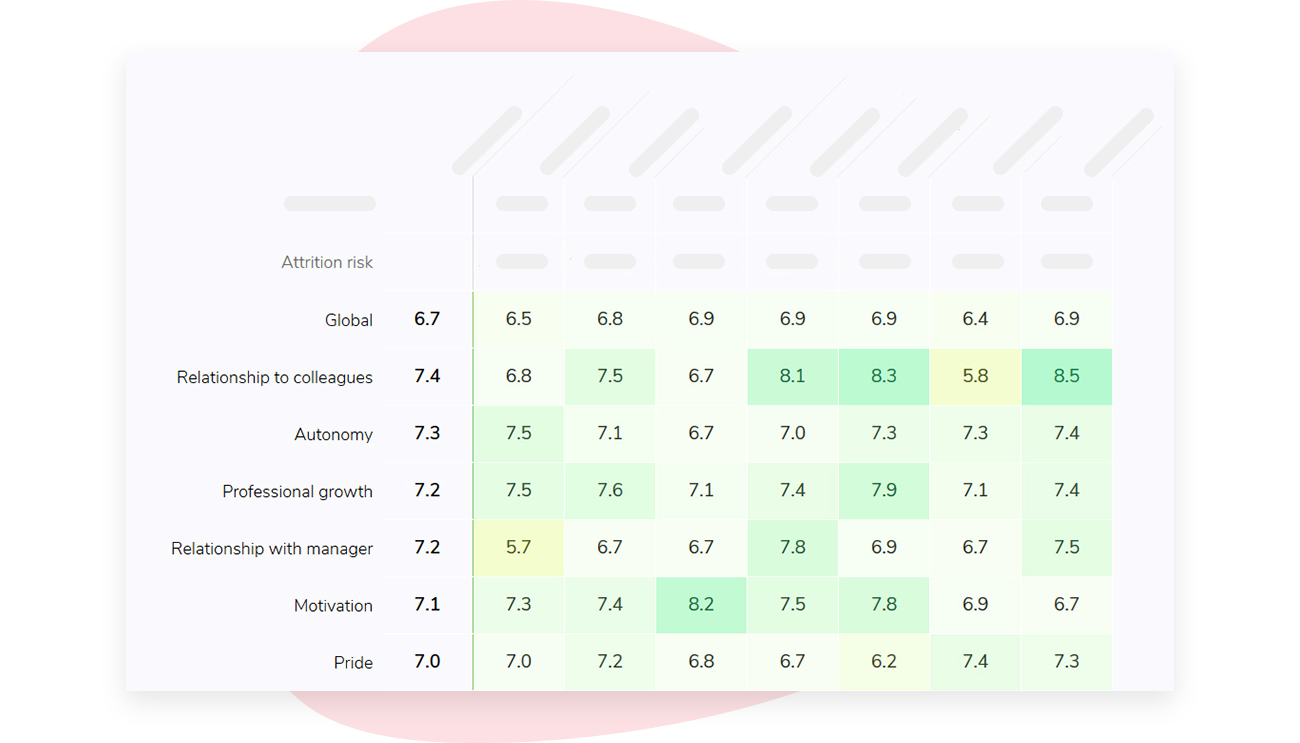
From there, your HR team can compare the trend for that group to their exit data and work with the manager to make a specific change. It’s important to note that survey results are not meant to tell you who will leave, and they should not be used for that purpose.
If you’re interested in learning how Sparkbay can help you build a more engaged workforce, you can click here for a demo.
11. What should be included on the board slide?
So, which retention rate should you present to your board of directors?
Ideally, neither. Instead, you should present the retention measure closest to a business decision and then provide a rich level of context for your board to properly interpret your results. A snapshot view should present the following:
- The number and percentage of voluntary turnover, specifically regrettable turnover, over a rolling 12-month period in critical roles (these roles should be defined in advance) and the number of ready-now successors
- Retention of new hires, after 12 months, segmented by different hiring cohorts to provide insight into whether you’re improving your hiring quality
- Overall turnover rate, presented to give context and with an explanation of the time frame, inclusion rules, and average headcount calculation method
- At least one leading engagement metric recommendation Trend your "intent to stay" data or other leading indicator metrics from the same group of employees and compare that to the proportion of employees leaving one or two quarters later
If your headcount changed significantly during the lookback period, include a short footnote explaining this. This means you should highlight if your organization ramped up hiring or shrunk a specific unit rather than only highlighting the net change at the end of the year. You should also explain if a large percentage of voluntary turnover came from newly hired employees or if there was a significant shift in the tenure grouping of the workforce.
This helps answer the question of "why did our turnover rate increase?" before it’s even asked.
If your board members want to see the retention rate they’re familiar with, keep this in your backup materials and clearly indicate the start date population within this calculation.
12. Align on definitions before the next board cycle
Sit down with your finance counterparts before the next reporting cycle to confirm you’re aligned on separation dates (last day worked vs. contractual end date), headcount snapshots, and rules for transfers, rehires, and fixed-term contracts coming to an end.
If you have any trend data based on different methodologies, ask your team to re-calculate them.
Once you’ve aligned on what constitutes a pivotal role or a regrettable exit, get sign off on these definitions from the leaders who will be using these figures.
Attach these approved definitions to the first reporting slide sent up to the board.
If you’re interested in learning how Sparkbay can help you build a more engaged workforce, you can click here for a demo.