If every team independently distributes surveys, employees will only see the pile of survey requests they wind up with.
On Monday morning, an employee receives an engagement pulse check from HR.
By Thursday afternoon, that same employee receives a training evaluation request and a wellness check asking how they’re doing.
Each time, the sender promises the questionnaire will only take 5 minutes to complete, and each time, the sender thinks they’re asking very little of their employees.
The problem is that they’re each unaware of the other requests. Those three surveys have asked that employee to respond to roughly 20 minutes’ worth of questions in a week that was already full. And those aren’t even including the reminder emails that’ll be sent before Friday!
You’ve probably noticed survey response rates dropping for surveys you care about, and been told that means your employees have disengaged.
In reality, it usually doesn’t.
What’s really happening is that there’s nobody in your organization responsible for managing the total number of feedback requests sent to each person. In other words, your organization isn’t managing survey fatigue very well.
Sure, HR has control over its own surveys and questionnaires, but it doesn’t have control over the help desk surveys that go out when a ticket closes, the LMS evaluations that are sent upon completion of a course, or the vendor questionnaires procurement team approved.
When we search for ways to avoid survey fatigue, we usually get advice like "keep your surveys short" or "don’t send too many." Clearly, these tips don’t account for the reality that there may be many senders on each survey.
One way to get a handle on this reality is to create a shared survey calendar.
Identify survey overload and compile surveys onto a single, company-wide calendar
- 1 Are you subjecting your employees to a thousand pulse palooza?
- 2 What’s the risk of asking too many questions?
- 3 Understand your survey landscape
- 4 Establish a research calendar that people will adhere to
- 5 Keep a central calendar without creating bottlenecks
- 6 Merge, piggyback and retire
- 7 Close the loop or lose the room
- How Sparkbay can help you keep pulses useful
- 8 Win over the survey owners
- 9 Are we making progress on survey fatigue?
1 Are you subjecting your employees to a thousand pulse palooza?
Right now, who can survey your employees without permission?
In most large organizations, the answer is pretty much any team with a form tool licence or any system where a feedback prompt is turned on by default. These automated requests often fly under the radar from an audit perspective since no one "sends" a ticket closure survey.
Then there’s the question of reminders. If a survey has two reminders, does that count as three requests for survey participation?
From the perspective of your employees, it definitely feels that way.
Plus, certain teams keep using the same handy lists - the HQ distribution list, the pilot group, the managers who volunteered last time - leading to over-surveying while frontline workers who don’t regularly check an inbox are barely surveyed at all.
Sometimes there’s an attempt to fix this by introducing new methods for surveying (e.g., SMS links, kiosk access). This can lead to a survey overload for workers who go from receiving almost no survey requests to receiving all the survey requests at once.
Let’s say you’ve just hired a new manager at a site that’s moving locations. Within one month of their arrival, they’ll receive the company pulse, a leadership program evaluation, a survey about tools, and a survey about the site move. On average, they may feel like they’re receiving a reasonable number of survey invitations, but this snapshot view is misleading.
It’s better to understand what the 10% of most-invited employees are receiving, as opposed to looking at the mean number of invitations per employee.
Studies on survey participation have long shown that people become less inclined to answer surveys the more they’re asked. This depends on factors like who the audience is and whether they’ve seen actions taken based on past survey results. This is why applying a single, company-wide quota to survey invitations isn’t a good idea.
What matters is the number of survey requests that are sent to one person, not the number of surveys the company sends out.
2 What’s the risk of asking too many questions?
The most obvious risk of survey length is a decrease in survey response rate.
But what’s more impactful is the quality of your data. If you still receive a substantial amount of responses, you want to make sure they’re thoughtful. You can identify poor quality data by looking for straightlining in grids of questions, survey completion times that are too fast to reasonably answer the questions, open-text response boxes that are left blank or simply filled with "n/a", or high drop-off rates after the first page break.
Researchers call this phenomenon "satisficing" or providing an answer that’s good enough to get the survey over with rather than thinking through each question. It’s important to flag instances of straightlining or satisficing before you compare this quarter’s score to the last quarter’s score.
What makes this dangerous is the direction satisficing respondents tend to lean, which can impact the degree of your survey results. When respondents are fatigued, they tend to gravitate towards neutral or the first acceptable response option available. This can lead to a bias towards neutrality, pushing your scores towards the middle of the range.
So if you see a decrease in employee engagement scores in the same quarter you notice an uptick in straightlining or sub-minute completions, you’ll want to take those results with a grain of salt.
Even more concerning is who is choosing to participate when the overall response rate is low. As Robert M. Groves shows in a 2006 Public Opinion Quarterly article, lower response rates don’t necessarily mean larger survey error. The people who don’t respond might not feel different from those that do. In practice, company leaders should compare their survey respondents to their employees in the HRIS based on tenure, location, and job family. Then, they should compare responders on day one to responders who only responded after the final reminder. If the individuals who only responded after the final reminder have lower scores than the day one responders on the same items, it’s fair to assume the people who may not have responded at all have even lower scores, making your overall survey score optimistic.
In the end, that pulse survey with 10,000 employees taking 5 minutes to complete adds up to over 800 employee hours - assuming every employee responds. And that’s just the time to complete the survey based on the minute length stated in the survey. It doesn’t account for time spent sending reminders, analyzing the data, or even the time spent by managers to review the results and discuss potential actions.
It makes sense to spend this much time if it’s leading to a decision, but what if that question keeps coming back next month because two owners never checked the results from the last time you asked that question?
Over time, employees will notice this and stop viewing employee surveys as an opportunity to be heard, and instead to view them as proof that nobody bothered to read their last answer.
3 Understand your survey landscape
Conduct an audit of all survey exercises targeted at employees. Look back over the past 12 months. Find your surveys by speaking with different departments, reviewing procurement records, reviewing software licences, and reviewing system settings.
This ensures you find surveys linked to vendors or triggered by other tools.
Once you find these surveys, find out details such as who owns the survey, which employees receive the survey, how the survey is sent out (Is it scheduled? Does it trigger upon an event?), when it’s sent out, how often it’s sent out, how many reminders are sent, how many questions are in the survey, and what the purpose of the survey is. Then ask the owner of the survey what kind of decision was made based on the results of the last survey. (Hopefully something more useful than "We shared the report"!)
If possible, create a survey invitation list and count how many survey requests each employee receives. Then break that data down by location, role, and tenure within the company. This helps you create a heat map, based on employee groups and weeks, to identify potential survey collisions. (Keep in mind that this invitation list is personal data, so limit its distribution and, if you have works councils, confirm whether this kind of analysis would require their consultation)
You can also use this data to identify your company’s survey fatigue threshold instead of pulling a number off a vendor blog. Group employees based on the number of survey invitations they received the previous quarter and then look at their completion rate for your main survey. By doing this, you can identify when there’s a drop in completion and therefore identify a survey load your workforce can tolerate. (You may want to do this separately for frontline and office employees to account for workforce differences.)
What kind of survey fatigue landscape survey are you hoping to identify here?
You want to identify situations where two different functions are assessing employee satisfaction for the same service but using different questions. You also want to identify recurring surveys where the dashboard has not been accessed for months. You want to identify questions where the person tasked with collecting employee responses has no authority to do anything with those responses.
Keep in mind, not all repeated questions are bad. Periodic, consistent, stable survey questions are one way to collect information on change over time. What is wasteful is assessing the same construct using three different sets of questions, through three different instruments, with three different owners, with no collective plan for how to use results.
Finally, longer questionnaires put more pressure on employees to complete the survey, so be aware of how long your questionnaire actually is. Instead of using the estimated questionnaire time listed in your survey tool or the estimated time you include in your survey invitation, use the actual median time it takes employees to complete the questionnaire according to your survey tools. If your questionnaire includes open-text questions, know that it’ll take longer than advertised for people to complete it, especially if they want to put real thought into their responses.
And remember, those are the respondents you most want to keep around.
4 Establish a research calendar that people will adhere to
Identify a single owner for your research calendar.
If HR is responsible for the majority of survey distribution, it makes sense for the People Analytics team to own the calendar.
If your largest survey distributors sit outside of HR, consider setting up a small listening council that includes other key players like IT, L&D, or Facilities.
This would make the calendar more useful, as owners are more likely to respect the schedule when it comes from their peers as opposed to another function.
Regardless of who owns it, the calendar owner should have access to all planned survey distributions.
This way, the calendar owner can flag weeks that are already busy and gain the authority to make decisions about when to distribute surveys without needing to escalate each decision.
Once all of the planned survey requests are accounted for, the calendar owner should be able to help different teams prioritize their requests.
This way, a census engagement survey can be prioritized over a survey that’s meant to evaluate a single session.
You can create priority tiers. Tier 1 surveys might be enterprise-wide surveys that require a protected window with no competing survey distributions to the same population, and an agreed-upon plan for sharing survey results before the survey distributions began. Your main engagement survey, if you conduct one, could fall into this tier.
Tier 2 surveys could be recurring surveys for a specific function or employee population, such as IT support surveys or onboarding surveys. The owners of these surveys could have their recipients’ names saved in the calendar owner’s system, so they could book a date for a survey distribution a quarter in advance, knowing the audience was also clear.
Event-triggered surveys may require a different approach. They may need to have a throttle rule applied, rather than having a scheduled distribution date. For example, you may want to ensure that a person does not receive more than one ticket-related survey within a set number of days.
Setting this rule requires an understanding of how often users tend to open support tickets (not the average user, but perhaps the user who opens the most tickets) to ensure you don’t cut off the responses from people with the most to say on your organization’s IT.
Finally, your priority tier system might rule that project surveys are tier 3. That is, these are one-off surveys for a specific project or initiative. Although it may seem unnecessary to add this survey to the calendar (as this team may only need to speak to 200 people tops), it does need to be accounted for.
There are only a specific number of people you can pull for this specific project, and it’s the research calendar that will let the project team know if those 200 people are already at their limit.
When setting your priorities, also determine a cap on the number of surveys per employee per quarter, and set a total minutes cap instead of a total number of surveys.
This way, teams can’t meet the survey limit by distributing a single, bloated, time-consuming survey in place of multiple smaller surveys.
Once you have a number in mind, test it against results from your audit before announcing it to the organization. Keep in mind, there isn’t a universal number that’s safe. And be aware that you might need to account for special populations like new joiners who will be participating in onboarding activities that include a number of check-in surveys.
You’ll either need to exempt those from their general survey cap or exclude new joiners from tier 3 survey distributions for their first few months.
You should also be able to block out weeks you’d like to protect on your calendar, such as performance review cycles, peak operating periods, or the weeks around a big reorganization announcement.
While you’ll allow for exceptions, the main objective is to make sure survey distribution teams are aware of these potential conflicts before distributing their surveys to avoid negative feedback.
A shared spreadsheet is an easy solution, but it has to be maintained and updated by the respective owners.
Each spreadsheet entry should include details about when the survey should be distributed, what the target audience is, the median time to complete the survey, whether a reminder is scheduled to be sent (and if so, when), details about who on the team is responsible for the survey, and a link to the survey’s action plan.
If you’re tempted to use your survey platform as your research calendar, understand what it can do. While most survey platforms can attribute throttle controls to survey invitations, they can’t do that for invitations coming from a different tool, say from your IT team’s tool.
Finally, ensure the research calendar is shareable within your organization.
If it’s a research calendar that only the HR survey team can see, it won’t effectively discourage survey requests from teams like IT or an external vendor.
5 Keep a central calendar without creating bottlenecks
Asking an employee to complete a training evaluation is not the same as managing a central calendar for all employee communications.
You don’t need to bring stakeholders together every time you want to evaluate a training session, but you do need to manage your calendar’s intake process effectively.
To that end, ask owners of evaluation requests the following questions before they insert their request into the central calendar:
- What specific group of employees will be receiving this survey and when will they receive it? (Avoid generalizations like "all staff in scope")
- Is there existing data captured in a different survey, system, or even last quarter’s results that provides an answer to your question?
- Can your questions be included in a request that we’re already planning to send to the same audience?
- Who will be reviewing the results for your evaluation and what actions will you take if these results are not good? (If they can’t provide a good answer to this question, they aren’t ready to send this evaluation yet)
Promise and deliver a response time of a few days. If employees have to wait too long for the go-ahead to send their survey, they’ll find ways to bypass your process. And if one team bypasses your process, your central calendar is compromised.
Consider whether you need to schedule urgent communications. After a major service failure or a sudden change in employees’ working conditions, it does not make sense to receive employee feedback via the next scheduled pulse. Ask what decision hinges on the ability to receive this input and how urgent it is.
If your calendar is full, you may need to push a lower priority item.
Smaller local surveys may not need to go through the full central calendar review process. You can ask teams to simply register their initiatives on the central calendar. Reserve the central calendar review for communications that reach large numbers of employees or that go out on a recurring schedule.
A good rule of thumb is that any employee communication that goes across teams or happens on a recurring basis should be reviewed through the central calendar process.
If this feels like an added approval layer nobody asked for, that’s fair. Just evaluate this step based on whether it helps owners more efficiently reach the right people with a better response rate than they could do on their own.
6 Merge, piggyback and retire
When you can see your entire survey schedule at a glance, it’s easy to identify opportunities to merge surveys or combine questions.
You may decide to develop a shared question bank for several teams working on the same topics. This way, you can finalize the wording of questions and the scale of responses well in advance of the next survey cycle. This helps you avoid disruptions to trend data caused by, for example, rewording questions or changing from a 5-point scale to a 7-point scale.
You may also decide that it’s appropriate for various teams to add short modules to an existing survey. This makes sense if the intended audience is the same and the timing of the survey fits. In this case, consider rotating modules rather than continually adding modules to the survey.
If each survey owner adds 4 new questions, you haven’t addressed survey fatigue - you’ve just created a longer survey and compromised the integrity of the core survey questions.
Consider also the order of questions in your surveys. If you expect participants to experience survey fatigue, you may wish to lead with your core, trend survey questions, and follow up with the additional modules.
One of the most underutilized survey options is sampling. There are also genuine differences of opinion among employee survey practitioners about the value of sampling. On one side, there’s the argument that conducting a census survey sends a message that every employee’s voice and opinion matters.
On the other side, there’s the argument that a rotating sampled survey respects employee time by not engaging most people most of the time. Conducting a census survey may be necessary if you need survey results for every team. On the other hand, a company may want an organization-level, high level read on a specific topic that isn’t part of their core survey.
In that case, a sampled survey may make more sense. If you choose to sample, be aware of the numbers you need. Small teams may fall beneath your reporting threshold, eliminating them from your results.
You may need to stratify your sample or decide to survey small teams in their entirety while sampling larger teams.
Before launching a survey, consider what existing data may help you assess employee sentiment or experience. Do repeat customer tickets highlight areas for improvement in employee services? Are there frequently mentioned themes in exit interviews or specific turnover rates by direct manager that could help you focus on specific areas?
While these data points are not a substitute for an employee’s experience and opinion, they may help you develop sharper questions for a smaller group of survey respondents.
Finally, don’t be afraid to retire a survey that isn’t generating data that teams can act on. Just because a survey has "always" been distributed doesn’t mean it needs to be. When you book recurring surveys in your calendar, include a review date so that it’s easy to evaluate whether a survey should be retired.
7 Close the loop or lose the room
You don’t want to become the boss who sends out a survey and disappears.
As Don A. Dillman and his coauthors write in Internet, Phone, Mail, and Mixed-Mode Surveys: The Tailored Design Method, people decide whether or not to respond based on a social exchange. They weigh the cost of responding with the benefit they expect to receive. They only expend the energy to respond if they believe the benefit will materialize. Reducing the number of surveys is one way to reduce the cost, but another way is to build trust through follow-through.
This means reporting back to employees while the survey is still fresh in their minds. Communicate what you heard, what you will change, and what you won’t change and why. This builds trust since it shows someone actually reviewed the request.
If there’s an issue that’s outside of the team’s control, make it clear who has the next decision.
It’s also important to deliver a "you said, we did" update that features a specific change and follows up to see if that change worked. For instance, did IT receive feedback that employees felt help desk requests weren’t updated enough while they were waiting for a resolution? Did they change the status messages from the help desk and then check to see if the number of complaints reduced?
This is a believable way to show action. Saying things like we’re listening and taking your feedback seriously is not enough.
Managers need to know enough about survey results to understand the story behind a team result, so they can have meaningful conversations with their team. They also need enough time to talk about the team result, discuss next steps, and commit to an action that they own. It’s important to agree on one action per team, not one action plan per survey.
People care about what employers will do with their feedback, not just whether employers ask for it. So be mindful about scheduling all parts of your feedback process. If you intend to report back to employees, schedule this review and report back time before you schedule the next feedback request to that audience.
How Sparkbay can help you keep pulses useful
Sparkbay helps you stick to a predictable, published schedule for your engagement pulses. This turns the engagement pulse into a "Tier 1" activity that other owners can plan around, instead of a vague "when you have time" project.
Sparkbay also lets you customize the cadence of your engagement pulses as well as the wording of your survey questions. This helps you adapt the cadence and questions to what you’re really trying to track, and keep the wording consistent for easier trend analysis.
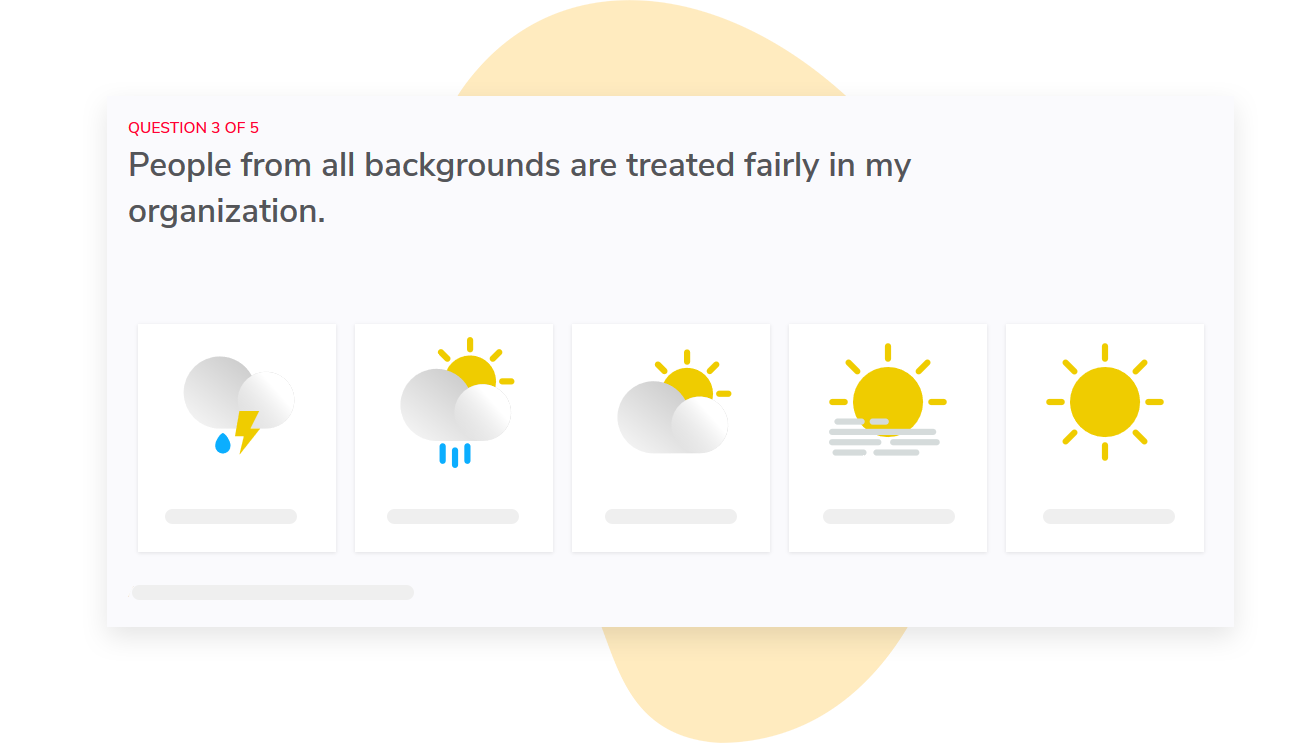
Sparkbay gives you an engagement score out of 10, so you have one consistent metric to monitor over time.
You can also compare results across different groups to see where a targeted follow-up might be useful. Instead of resurveying the entire organization, you can ask a more focused question to a smaller audience.
Sparkbay also keeps results hidden until a minimum number of responses, set to 5 by default but customizable, are received. This is an important feature that lets you decide how far you want to divide your data or how small of a sample you want to use for analysis.
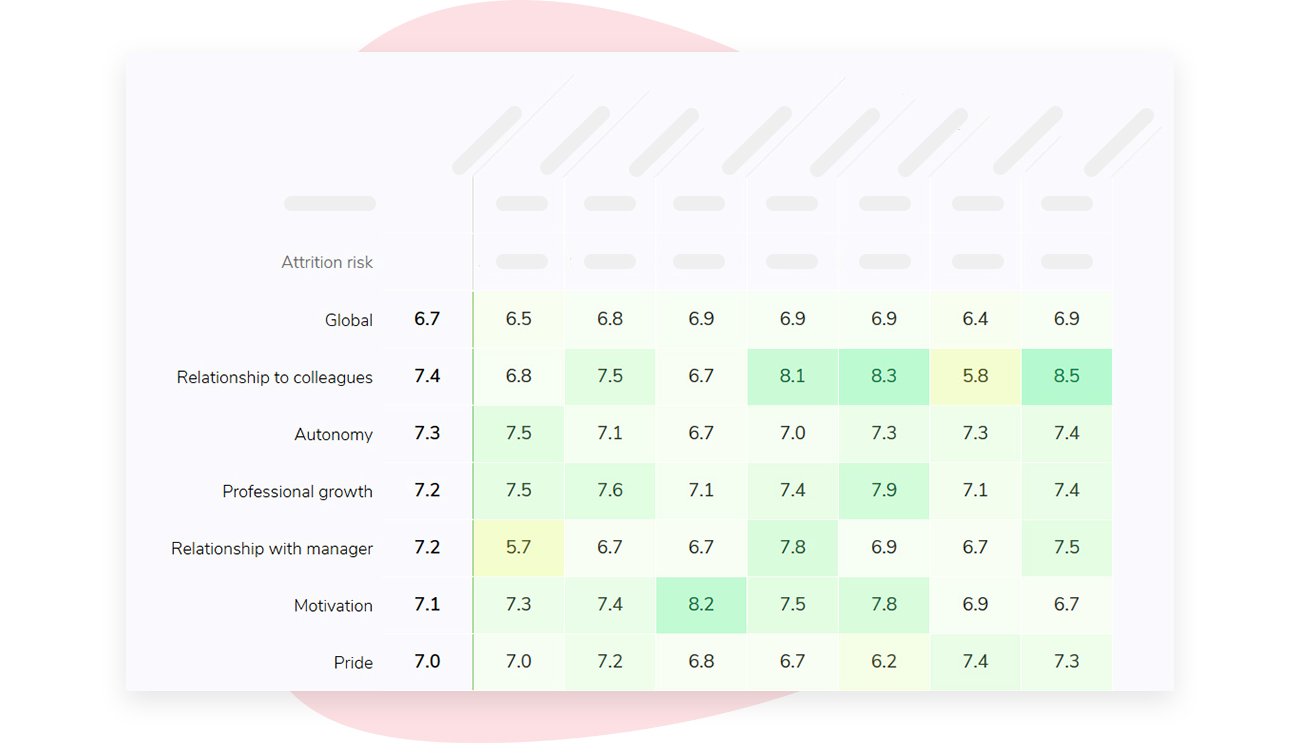
In large organizations it’s easy for the follow-up process to break down during the report sharing process. With Sparkbay, report sharing access is automatically adjusted based on the organization chart, so each manager only sees reports for their teams.
You can also configure what different audiences see on their dashboards.
This makes it possible to give every manager a "role" in the follow-up process, instead of funneling all follow-up work through HR.
If you’re interested in learning how Sparkbay can help you build a more engaged workforce, you can click here for a demo.
8 Win over the survey owners
Part of ensuring the success of the survey calendar is winning over other survey owners.
You may want to bring your biggest survey owners into the survey calendar audit. This way you can show them the collision weeks and show them their own median completion times. You can discuss which questions are actually driving decision-making.
For example, an IT survey owner may realize their survey is scheduled to go out the same week as the survey for employee engagement census. You can use this information to encourage them to move their survey so that neither survey is harder to complete.
Similarly, you may want to make a reciprocal offer to survey owners who wish to join a shared survey. Owners need to know that they’ll have access to their results. It’s important to agree ahead of time who will have access to what group level findings when combining questions.
Plus, an executive sponsor may be needed to help the survey calendar owners manage conflicts. Without an executive sponsor, survey owners with the most vocal deadlines may always get the most desirable time slot. An executive sponsor can support you if an owner is asked to move their survey to a different week.
This is different from approving the wording of survey questions.
Some specialty survey instruments may be best kept separate, such as clinical safety surveys or regulatory surveys. These can still be included on the survey calendar, so their timing is visible.
9 Are we making progress on survey fatigue?
Before you start developing solutions, it’s important to understand the extent of your survey fatigue problem.
To do this, you need to know how many invitations, reminders and survey minutes you’re asking your employees to commit to each quarter.
We recommend tracking the following metrics:
- The number of survey invitations, reminders, and total survey minutes per employee per quarter
- The percentage of employees receiving more than your capped number of survey invitations
- The number of surveys distributed in the same week, per employee (or per group of employees), which can cause major survey fatigue
You should also be tracking your survey response and completion rates.
While these metrics are important, they aren’t enough on their own, and here’s why:
- Your response rate may stay the same, but your respondent population may be becoming less representative of your workforce
To avoid this, compare the characteristics of the people who responded to your survey to your HRIS on every survey cycle.
Then, based on your audit, track how many quality signals you receive back (e.g. straightlining, completing the survey in under a minute) to help you understand the quality of your survey data.
This, combined with your response rate, will give you a better understanding of how effective you are at reducing survey fatigue.
It’s also useful to ask your employees directly how they feel about the volume of survey requests they receive per quarter. This can be done once a year with one simple question.
Finally, you want to know how many surveys have an identified owner, have reported results, and have documented actions taken as a result of the survey. This helps you understand how many surveys are likely to receive strong response rates moving forward.
To know if you’re making progress on survey fatigue, you need to understand where you’ve been and where you’re going. You need data on how many survey invitations have been sent out over the past 12 months and how many are planned for the next quarter.
From there, you can start identifying potential survey collisions and provide an opportunity for survey owners to coordinate before forcing anything at the calendar level.
If you’re interested in learning how Sparkbay can help you build a more engaged workforce, you can click here for a demo.